The Deep Inspect Update
v.1.2.14
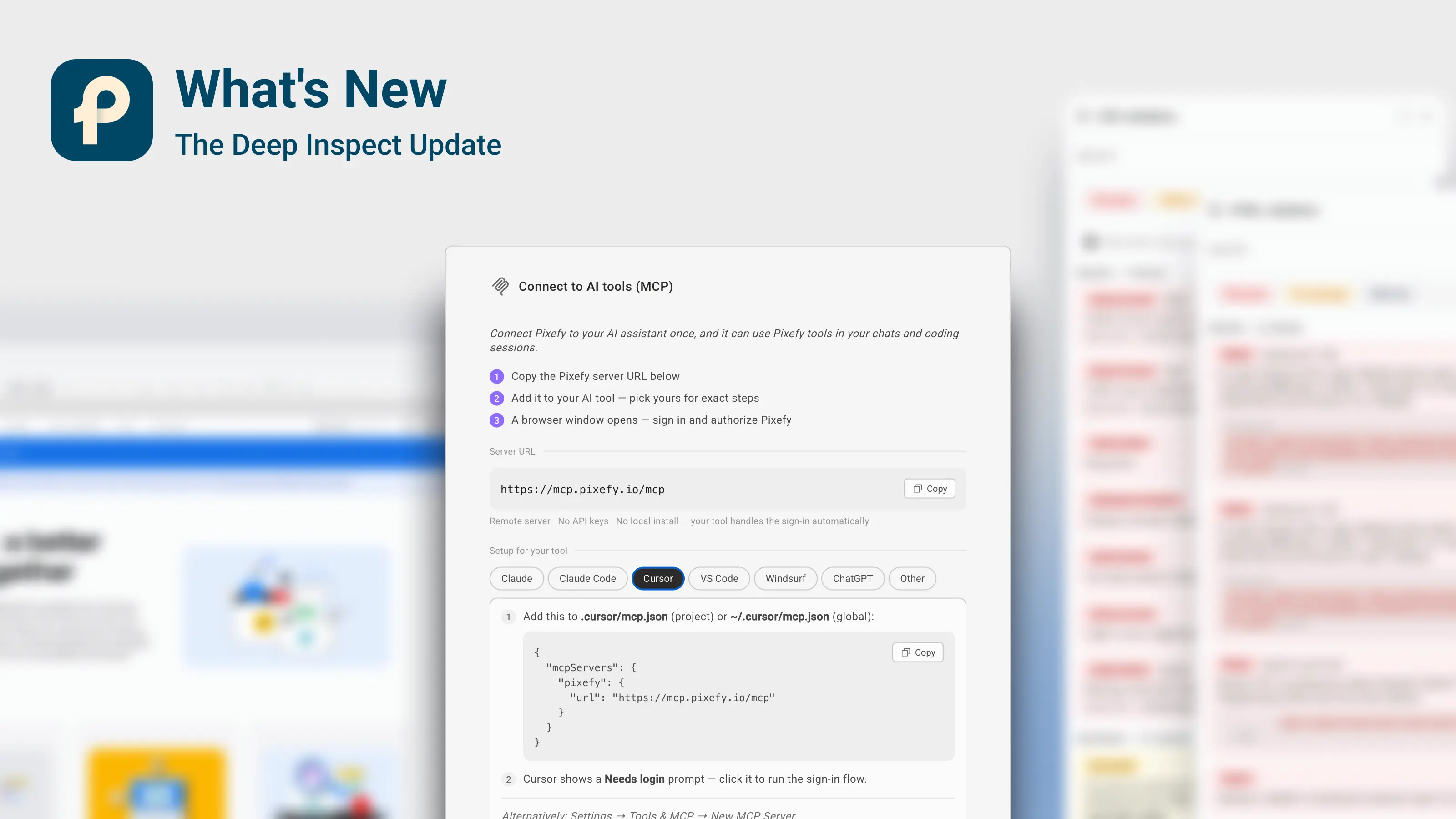
Stop guessing what your CSS is doing. This release answers the questions your browser never could: why is this value what it is, what happens if that rule goes away, and is this page even valid? Inspect can now switch any CSS declaration off and show you exactly what's underneath, trace every computed value back to the formula and design tokens that produced it, and run whole pages through the official W3C validators — while your AI assistant plugs straight into Pixefy over MCP. Add instant startup, projects that open themselves, and a long list of stability work, and 1.2.13 is our deepest release yet.
What's new in Pixefy
⚡ New: Reload with cleared cache
Skip the stale-cache guessing game. Reload your panes with the browser cache fully bypassed — fresh CSS, scripts, and images straight from the server, scoped to your Pixefy tab only:
⌘⇧R / Ctrl+Shift+R hard-reloads all panes
Shift+click a pane's reload button to hard-reload just that pane
Turn on Menu → Pane loading → Always clear cache to make every reload work this way
The tech stack inspector also re-checks server headers after a reload, so hosting and CDN changes show up immediately.
☑️ New: Switch off any CSS declaration — and see what's underneath
Ever wondered what an element would look like without that one rule? Every property row in the Inspect panel now has a checkbox (Pro). Untick it and Pixefy disables that declaration — the site's own stylesheet rule, an inline style, or your own Pixefy override — and shows you the value the browser actually falls back to, computed from the page's real cascade:
Disabled declarations appear struck through with their replacement right beside them:
display: flex→ now usingblock.Choose your blast radius: disable it for just the selected element, or for every element sharing the class.
Unlike DevTools checkboxes, these toggles survive a reload — they're saved with your workspace, re-applied when panes reload, and recalculated when a pane's width changes which media queries apply.
Every toggle lands in the Activity tab and is spelled out in your CSS exports and Trello, Linear, and AI hand-offs — so a developer knows exactly which declaration to remove, not just which value to set.
Changed your mind? ⌘Z / Ctrl+Z steps back through your Inspect edits and toggles.
🧮 New: See the why behind every CSS value
getComputedStyle tells you a font is 33.6px — but why is it 33.6px? Pixefy now shows you (Pro). Wherever a value is driven by clamp(), calc(), min(), max(), or a var() design token, Pixefy reveals the story behind the number:
In the hover tooltip — hover any element in inspect mode and see
clamp(24px, 4vw, 40px)right under the computed size, or which design token (var(--color-ink)) a color comes from.In the Inspect panel — a small diamond beside the value opens the full picture: the Path from the authored declaration through every
var()token it passes, where each token is defined, and the final Result. Hover the diamond for the quick version — the winning declaration and how the value plays out across each of your pane widths.Click any step to copy it — colors come out cleanly formatted, with a confirmation so you know it's on the clipboard.
Works on more sites than ever — Pixefy now follows stylesheets through cross-origin
@importchains, so authored CSS is traced even when a site splits its styles across CDNs.Prefer a quieter panel? Toggle CSS variable hints off from the Inspect side menu.
Fluid typography, responsive spacing, and design-token chains finally stop being a black box.
🧪 New: Validate your CSS and HTML against W3C standards
Two new panels run the current page through the official W3C validators — no more copy-pasting into w3.org (Pro). Open them from View mode → CSS validation and View mode → HTML validation:
CSS goes through the W3C CSS Validator: errors and warnings neatly grouped with plain-language labels — invalid value, unknown property, parse error, vendor extension — each with its line number and the stylesheet it came from.
HTML goes through the W3C Nu HTML Checker: errors, warnings, and info messages with line numbers and the offending markup highlighted; repeated issues are grouped so one templated mistake doesn't drown the list.
Works on any page: when a site can't be validated by URL, Pixefy extracts the page's own CSS or markup and validates that instead.
Re-run any time from the panel — or cancel a scan mid-flight — without leaving your workspace.
🤖 New: Connect Pixefy to your AI tools
Your AI assistant can now use Pixefy directly (Pro). Open Account menu → Connect to AI tools and link Pixefy to Claude, Claude Code, Cursor, VS Code, Windsurf, ChatGPT, and more via the Pixefy MCP server — the modal walks you through each client with copy-paste-ready steps. Add one URL, sign in with your Pixefy account, and your assistant can use Pixefy's tools right in the conversation. Pairs perfectly with Copy context for AI when you'd rather paste a one-off snapshot.
🔍 Inspect that stays out of your way
Focus on declared CSS. The Inspect panel shows the browser's complete computed-style list by default — turn on Show only declared properties (Inspect → More) to see just what's actually written: matching rules, inline and inherited CSS, variables, and your own Pixefy changes.
The inspect tooltip now stays inside the pane. On mobile-width panes it used to hang off the edge and hide half its details — it now repositions and wraps to always stay fully visible, however narrow the pane.
Inspect mode now reliably freezes the page. Hover and click effects from the site itself (menus opening, links firing) can no longer sneak through while you're inspecting — the interaction shield is now guaranteed to stay up, even when a page throws errors underneath. Hold Alt when you do want to interact with the page.
Long values no longer get cut off silently. When a value is too long for its row, hovering reveals the full value in a clean overlay.
🚀 Opening Pixefy: instant and dependable
No more blank flash. Pixefy now shows a loading screen the instant you open it — theme-aware and readable while the workspace prepares behind it.
Stubborn pages can't stop it anymore. If a site interferes with Pixefy's startup — locking the document, racing scripts, or a previous Pixefy instance still winding down — Pixefy now detects it, recovers, and finishes loading cleanly.
📌 Projects are now the home for your work
A clearer model for what's saved and what isn't:
Workspaces not saved as a project now last only for the browser session. Your projects keep everything, forever — unsaved experiments reset when the browser restarts. The first time you make a change outside a project, Pixefy reminds you with a dismissible notice and a Save button that opens the project dialog right there.
The reminder appears for any workspace change — panes, measurements, view modes, user agents, settings — not just content edits. Viewers of shared projects get the same courtesy: a clear note that their experiments won't be saved to the project.
Projects now stay with you as you browse. Moving between pages, subdomains, or www/non-www variants of your project's site no longer drops you out of the project — the selector keeps showing your project and current page wherever you are on the site.
Signing out now fully resets the workspace to defaults.
🪟 Use Pixefy in multiple tabs at once
Run Pixefy in several tabs side by side — compare two different sites, each with its own security bypass and device simulation. Previously, opening Pixefy in a second tab could interfere with the first; each tab is now fully independent.
🛡️ Rock-solid on script-heavy sites
The Pixefy toolbar no longer shifts or disappears on ad-heavy or highly dynamic sites — Pixefy now actively defends its UI against page scripts that inject or remove content.
Your saved edits survive on modern framework sites (React, Framer & co.): changes are re-applied whenever the page rebuilds itself, however late that happens — including after in-page navigation.
🎯 Pseudo-class editing that actually sticks
Editing :hover, :focus, or :active styles now works even when the same property is edited in the normal state — hover your element and watch the change apply, live and after reload. (Previously the normal-state edit could silently win, making hover edits look broken.)
⚡ Your edits now stick — even on modern, script-heavy sites
Panes browsing a different page than the rest of your workspace correctly restore their own CSS changes after a reload.
Deleting a change from the Activity tab removes it from the page instantly — even if the page shifted around after you made the edit.
Editing the same element twice no longer creates duplicate activity entries.
Measurements now belong to the page they were drawn on — navigate a pane elsewhere and they tidy themselves away, returning when you come back.
Image swaps now behave like first-class edits. Replaced images belong to their project — switching projects swaps them along with everything else — they respect Hide changes, and they survive framework re-renders. Because replaced images live in your browser, the Activity tab labels them This browser, so you always know collaborators on other devices won't see them.
📁 Projects got a lot smarter
Projects can now open themselves. Tick Auto-open Pixefy for this project in the project dialog, and visiting the project's main URL launches Pixefy with that project already selected — your whole workspace, waiting for you. Pixefy is careful about its own reloads and pane navigation, so it never pops open when you didn't ask.
Switching projects now switches everything. The Activity tab, split view layout, and custom user agents fully swap when you change projects — no more leftovers from the previous project.
See every project's changes in one place. The Activity tab's URL dropdown groups changed pages by project — now for everyone, including invited teammates and pages outside any project. Shared projects carry a Viewer badge, and hovering a project reveals its pages; click one to jump straight there.
Invitations feel instant. Accepting a project invitation shows its quick links right away, no refresh needed.
Clearer view-only experience. Quick links in shared projects are read-only, and viewers see exactly what will and won't be saved.
🔐 Sessions and security hardening
Fixed rare issues that could unexpectedly sign users out — including a temporary network hiccup during session refresh no longer costing you your login.
Your login credentials now stay strictly on your device — they're no longer included in browser cloud sync.
🎨 Polish
Free plan color previews in the Inspect panel are clearer about what's included in Pro.
The tutorials page now labels every feature's plan clearly — Free, Freemium, or Pro — with a one-click path to upgrade.
The Breakpoint diff view rebuilds the moment you edit or toggle a property, so it always reflects what's really on the page.
Tooltips across the toolbar and panels now track their targets precisely — adapting to dynamic content, staying inside the viewport, and disappearing exactly when they should.
Huge embedded image sources (data URLs) no longer flood the Activity tab — long names are neatly truncated.
Consistent up/down carets across the Activity tab, tidier menus, and an assortment of small fixes for a smoother, quieter experience.
Did you like this update? Share it with others!


or


Available in the

Available in the