More Visibility, Better Stability, Smoother Testing

v.1.2.0
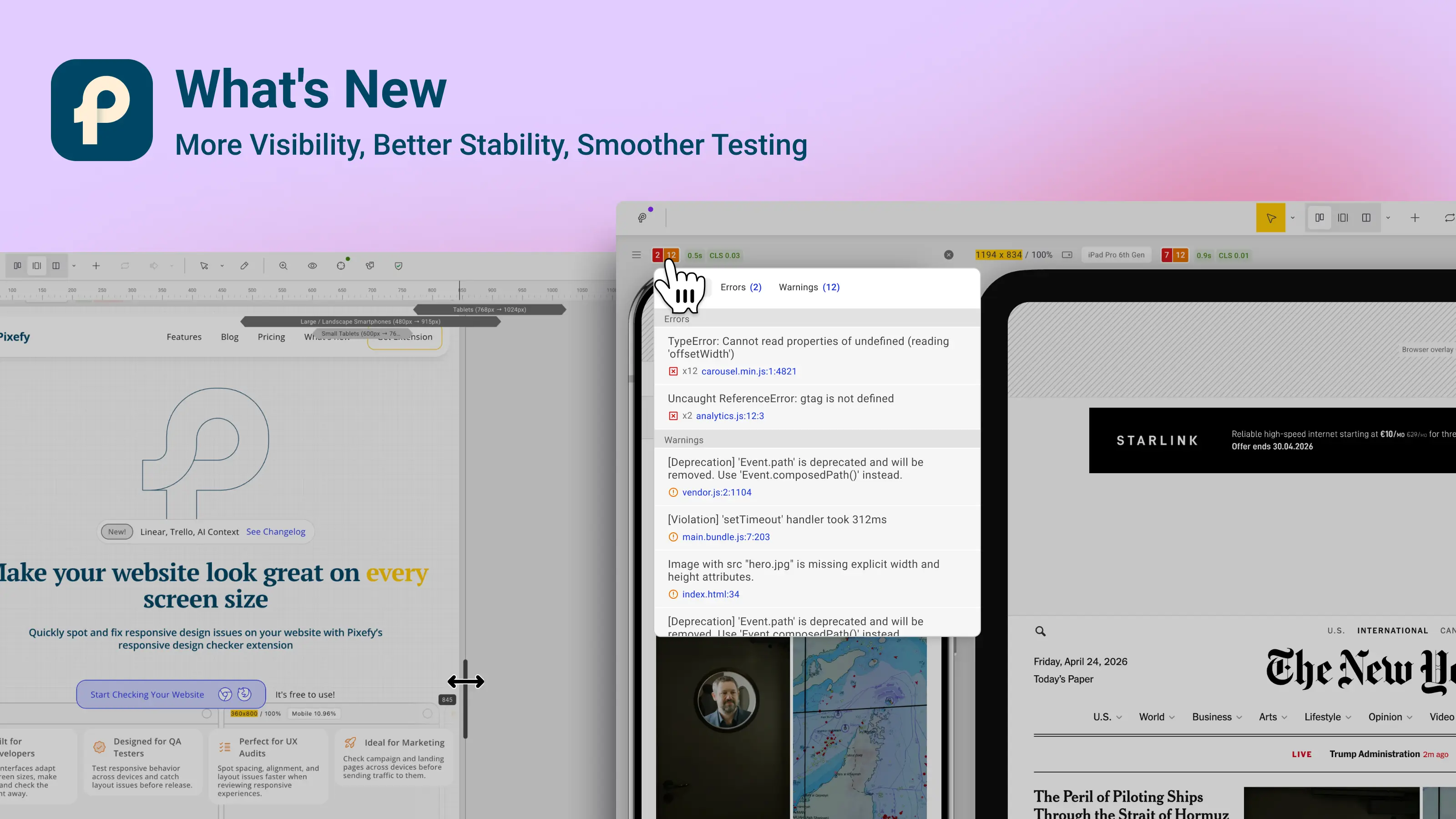
Pixefy interface showing console error monitoring, resize ruler, and performance metrics across responsive panes.

This was a big development week for Pixefy.

We listened to your feedback, fixed a lot of small and not-so-small issues, and added a few tools that should make testing websites easier to understand.

The biggest addition is the new Console Error & Warning Monitor for Pro users. Instead of opening DevTools separately, you can now see when a pane has console errors, warnings, or network issues directly inside Pixefy.

We also added a Resize Ruler, so you can better understand where your layout changes while resizing panes, plus Performance Metrics to quickly see load and layout shift information.

A lot of work also went into screenshots, sync, navigation, Firefox compatibility, UI details, and general stability.

Thanks again to everyone who reported bugs, shared feedback, and helped us improve Pixefy.

Summary

New

  • Console Error & Warning Monitor for Pro users

  • Resize Ruler for easier breakpoint checking

  • Performance Metrics on pane headers

  • Show / Hide submenu for toolbar, ruler, and metrics

  • Update check and restart option in the What’s New popup

Improvements

  • Better full-page screenshots

  • More stable scroll and selection sync

  • Improved iframe navigation handling

  • Stronger protection from third-party CSS affecting Pixefy UI

  • Better Firefox compatibility

  • Improved pane header behavior on small widths

  • Cleaner menu layout and UI details

  • Better memory cleanup and storage conflict handling

Fixes

  • Fixed many reported issues across panes, sync, screenshots, menus, iframe behavior, and general stability.

Did you like this update? Share it with others!

or

Updates

Other updates

We’re constantly improving Pixefy. Check out the latest features and updates we’ve added

See more in our

v.1.0.18

New

Fix

Pixefy now includes mockups, text selection sync across panes, a public feedback portal, and new release notifications.

Apr 16, 2026

v.1.0.10

New

Improvement

Fix

Export review tasks, add comments to changes, filter color issues, and inspect elements in bulk — plus improvements across device simulation and SEO checks.

Mar 23, 2026

v.1.0.8

New

Improvement

Pixefy now includes an SEO Overview panel and Selection Sync, making it easier to review page structure and inspect elements across multiple panes.

Mar 9, 2026

Updates

Other updates

We’re constantly improving Pixefy. Check out the latest features and updates we’ve added

See more in our

v.1.0.18

New

Fix

Pixefy now includes mockups, text selection sync across panes, a public feedback portal, and new release notifications.

Apr 16, 2026

v.1.0.10

New

Improvement

Fix

Export review tasks, add comments to changes, filter color issues, and inspect elements in bulk — plus improvements across device simulation and SEO checks.

Mar 23, 2026

v.1.0.8

New

Improvement

Pixefy now includes an SEO Overview panel and Selection Sync, making it easier to review page structure and inspect elements across multiple panes.

Mar 9, 2026

Updates

Other updates

We’re constantly improving Pixefy. Check out the latest features and updates we’ve added

See more in our

Pixefy on the Chrome Web Store

Available in the

Pixefy on Firefox Add-ons

Available in the

Pixefy  - Review websites across every screen | Product Hunt